Services Plugins FAQs

AWS Uploader no longer uploading after version 1.221

I just recently updated from 1.215.0 to the latest version 1.224 and my AWS file uploader stopped working. I reverted back to 1.215 and test up until 1.221 and thats where it stops working.

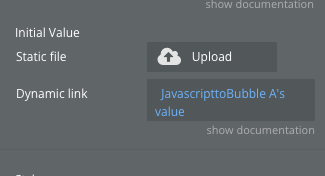
My set up currently uses custom js function to push a blob video file in chrome to the fileuploader. The way im doing this is In the builder im using Javascripttobubble element (JavascripttoBubble A - is the element name) and event from the toolbox plugin to pull the file blob and and then in my Fileuploader element im using the dynamic link with “JavascripttoBubble A’s Value” to initiate the upload and then in the workflows i have a fileuploader A generation URL event and am generating a pre-signed URL and then uploading. Like i said above.

Everything works with version 1.215.0 so my question is did anything change that would cause this set up to no longer work?

Ill add that i dont get a status from the uploader - progress bar stays at 0 and there is no error message popping up. It like the fileuploader doesnt know when to kick off anymore.

Hi @quinonez,

Thanks for the detailed report!

We need the following to help you to get things working.

  1. Direct link to the exact plugin you’re using (copy it from the Plugins tab → click the plugin name → copy the URL from the browser). There are several different “AWS File Uploader” plugins from us, all with similar names. :slight_smile:
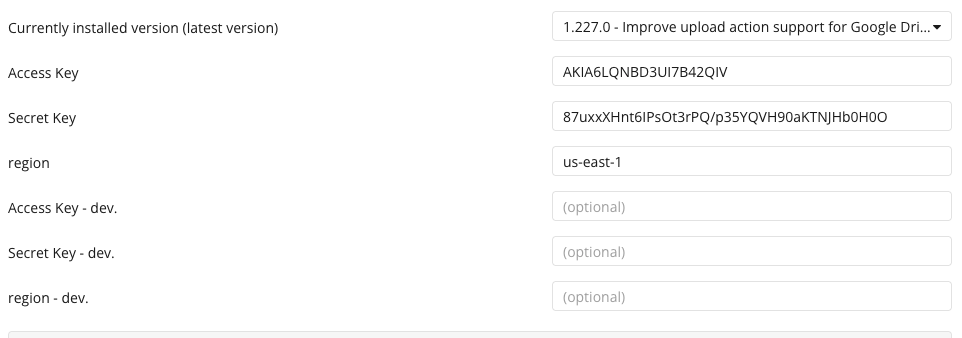
  2. Screenshot of your current plugin configuration tab (all fields).
  3. Screenshot(s) of the workflow where you:
  • Trigger JavascriptToBubble A
  • Trigger the FileUploader element with “JavascriptToBubble A’s Value
  • Any other relevant workflows
  1. A short screen recording (or step-by-step debugger screenshots) with Debugger turned ON so we can see what value actually arrives at the FileUploader element when you push the blob.
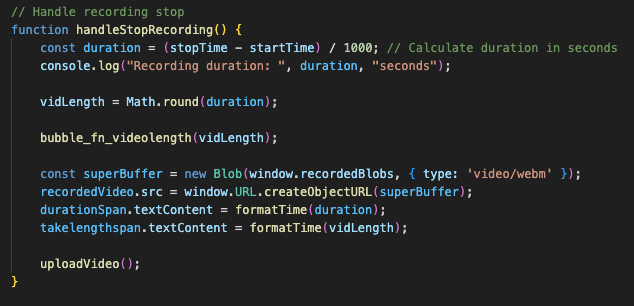
  2. Screenshot of the exact JavaScript code you’re using inside the Toolbox “Run JavaScript” action that captures the video blob and sends it to JavascriptToBubble A.

Looking forward to your reply – we’ll get this working again in minutes! :rocket:

Best regards,
Egor Smorodinov,
Support Team
Browse all Zeroqode Plugins for bubble
Banner_Last3

Awesome Thanks. Info below:

  1. AWS File uploader - Any size Plugin | Bubble

  1. Workflow:
    A. JS Function that runs when the stop button on the video recorder is pressed
    image

image

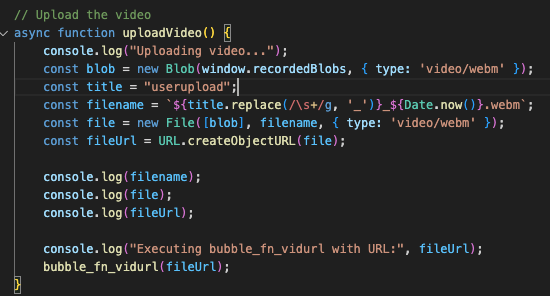
B. uploadVideo(); Function that adds the “fileUrl” the JavascriptToBubble A by the “bubble_fn_vidurl();” function
image

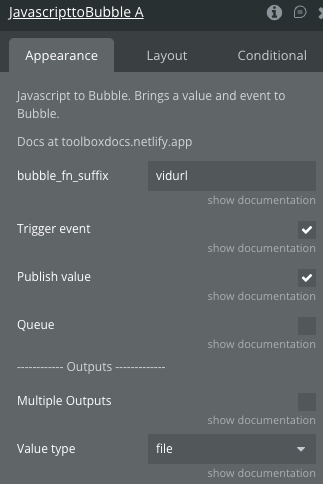
C. JavascriptToBubble A properties
image

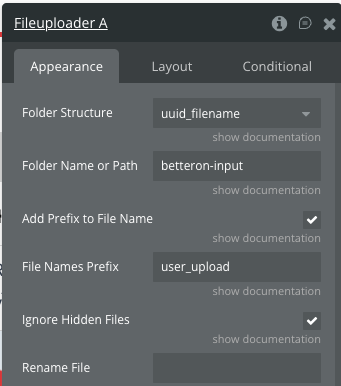
D. Fileuploader A properties
image
image

  1. 2 Videos. The first one is using the version of the plugin that works and the second one is using the latest version of the plugin where it doesnt work
    https://drive.google.com/file/d/1RZA3F-6lUM-emiadA0hX-B0snYm_nd62/view?usp=sharing
  1. Screenshots above

Hi @quinonez,

Thanks for the detailed explanation, screenshots, and videos — that really helped piece things together.

The issue you’re facing is caused by a change introduced in version 1.222.0 of the Zeroqode AWS File Uploader plugin. In versions 1.215–1.221, the plugin accepted URL.createObjectURL(file) (a blob URL) as a valid dynamic link input. However, starting from v1.222.0 and onward, the plugin only accepts a true File or Blob object, not a blob URL string.

You’re currently generating a blob URL in your JavaScript like this:

const fileUrl = URL.createObjectURL(file);
bubble_fn_vidurl(fileUrl);

This blob URL is passed into the uploader via JavascriptToBubble A, which used to work — but now it’s silently ignored in newer plugin versions, resulting in the uploader not triggering and the progress bar staying at 0 (exactly what you observed).

How to Fix It:

Pass the actual File object instead of the blob URL:

bubble_fn_vidurl(file); // Directly pass the File object

Your JavascriptToBubble element is already correctly set with Value type = file, so no changes are needed there. Just update the function to pass the file directly, and everything should start working again with versions 1.222 and up.

Let me know whether your workflow started working after this change.

Looking forward to your reply!

Best regards,
Egor Smorodinov,
Support Team
Browse all Zeroqode Plugins for bubble
Banner_Last3

Hi @quinonez,

Just wanted to circle back and see if you had a chance to test the updated approach — passing the actual File object instead of the blob URL.

This small change should get the uploader working again with versions 1.222+, so please let me know whether it resolved the issue on your side or if you’re still running into any trouble.

Happy to help further if needed!

Best regards,
Egor Smorodinov,
Support Team
Browse all Zeroqode Plugins for bubble
Banner_Last3

Thanks for checking back in. Im getting this error now after the change.

Error:

run_debug.js:612 Element JavascripttoBubble A - The plugin Toolbox / element Javascript to Bubble threw the following error: Error: Expected a file url as a string, but got a object (original data: {})
    at generate_JS_to_bubble_error (https://platform.betteron.com/package/run_debug_js/455c413856a65492f27ee84f4bb39cd790330095f6365d3cd895a664db494f94/xfalse/x31/run_debug.js:541:28667)
    at Object.JS_to_bubble (https://platform.betteron.com/package/run_debug_js/455c413856a65492f27ee84f4bb39cd790330095f6365d3cd895a664db494f94/xfalse/x31/run_debug.js:741:38388) (please report this to the plugin author)
 {original_error: UnexpectedError: Expected a file url as a string, but got a object (original data: {})
    at gener…, element_instance: ElementInstance2, action: null, code: '1764545202093x443986105192209900'}

Change:
image

Hello @quinonez,

Since the problem continues, we’d appreciate it if you could add our Support Team as a collaborator to your app so we can investigate further. You can follow these steps in the Bubble Editor:

  • Go to Settings.

  • Click on Collaboration.

  • Add support@zeroqode.com as a collaborator in your app.

  • Create a test page for us with the same use case and configuration.

  • Let us know where to find the test page for the search functionality.

  • Provide specific steps to reproduce the issue, along with details on the devices and browsers you’ve tested on.

We’ll take a closer look at the setup, and involve our dev team to figure out the reason for your issues.

Looking forward to your reply!

Best regards,
Egor Smorodinov,
Support Team
Browse all Zeroqode Plugins for bubble
Banner_Last3

Hi @quinonez,

Just checking in to see if this issue is still relevant for you.
If yes, could you please follow the steps from my previous message and add support@zeroqode.com as a collaborator, along with the test page and reproduction steps?

Once we have access to your app and the page where the issue occurs, we’ll be able to investigate further.

Best regards,
Egor Smorodinov,
Support Team
Browse all Zeroqode Plugins for bubble
Banner_Last3