
Services Plugins FAQs

I can't review the video I recorded with the "Video Recorder"

I’m building a video pitch recorder using the Zeroqode Video Recorder plugin on Bubble.io.

The recording and upload work correctly – the video URL is saved to the database with a valid https:// prefix. However, my Bubble VideoPlayer element always shows “missing element” even when it’s hidden (visible on page load = off, collapse when hidden=off).

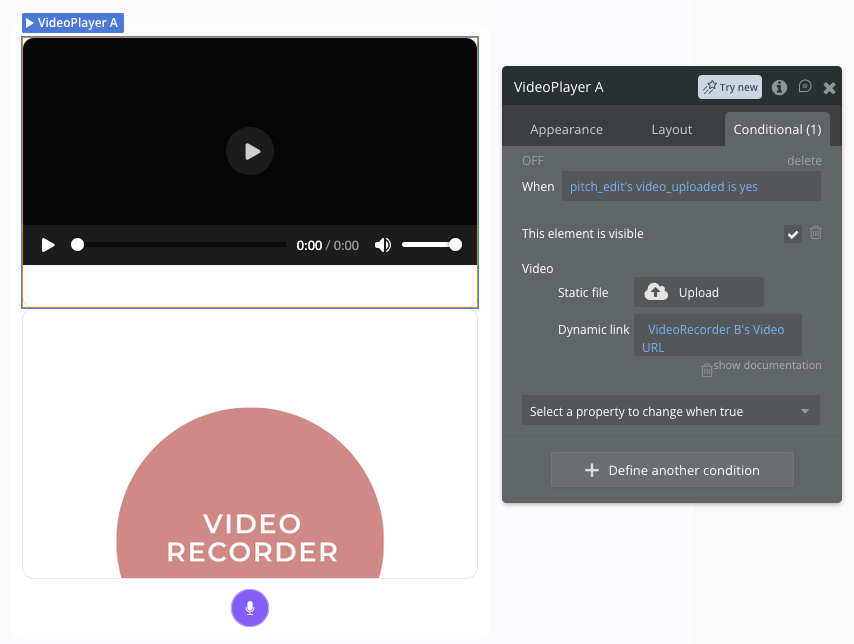
The VideoPlayer source is set via a Conditional: when video_uploaded = yes → show element + set Dynamic link to Current page’s Pitchprofil’s pitch_video_url.

The video IS saved correctly in the database, but the player never loads it and just shows “missing element”.

Has anyone solved this? Is there a better way to display a recorded video after upload?

This is the conditional that i have.
I am trying to solve this issue using Claude. I just need to be able to review the video :slight_smile:
Hope somebody can help me out here.

Hi @cancakiro94,

I’m sorry to hear you’re running into this “missing element” issue with the VideoPlayer. It sounds frustrating, especially since you’ve confirmed the video is saving correctly to your database.

Looking at your screenshots, I noticed a discrepancy: while you mentioned setting the link to the database field, the Conditional screenshot shows the Dynamic link is actually pulling from VideoRecorder B's Video URL (the plugin’s state).

To resolve this, please try the following:

  • Change the Data Source: In your VideoPlayer’s conditional, set the Dynamic link to Current page's Pitchprofil's pitch_video_url (your database field) instead of the plugin’s state. Plugin states are transient and can clear once the upload workflow finishes, which often causes the “missing element” error in the player.
  • Verify URL Formatting: Ensure the URL stored in your database includes the https: prefix. If it starts with //, the player may fail to resolve the path.
  • Test Visibility: Since you have visible on page load unchecked, ensure there isn’t a conflicting “Do when condition is true” workflow that might be resetting the element’s state.

For further reference on handling recorded files, you can check our documentation here: Zeroqode Video Recorder Docs.

If the issue persists after switching the source to the database field, could you please share a screenshot of your Browser Console (F12) when the error appears?

When you check the database entry for a failed video, does the URL play correctly if you paste it directly into a new browser tab?

Best regards,
Support Team
Browse all Zeroqode Plugins for bubble
Banner_Last3

Hi @cancakiro94,

Checking in to see if you’ve had a chance to test the suggestions mentioned above.

Did switching the VideoPlayer’s source to the database field help resolve the “missing element” error?

Let us know if you’re still running into trouble or if you have any updates for us.

Best regards,
Support Team
Browse all Zeroqode Plugins for bubble
Banner_Last3
