my workdlows for all items look the same:
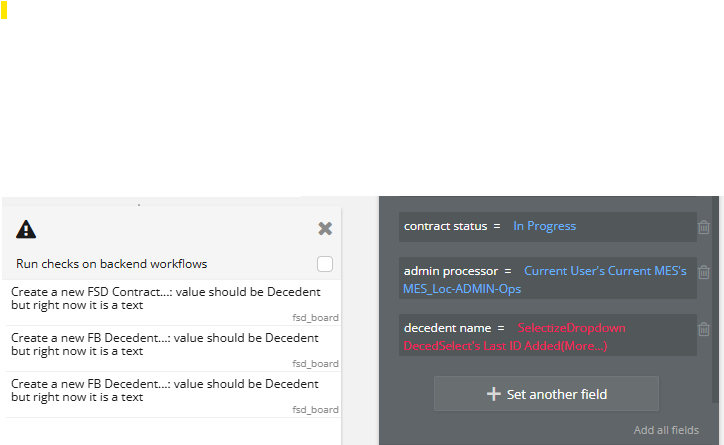
I know there is now a mismatch. The field wants a record id (unique ID)-Decedent. But why is it saying text after years of using Selectize?

my workdlows for all items look the same:
I know there is now a mismatch. The field wants a record id (unique ID)-Decedent. But why is it saying text after years of using Selectize?
Hi @markp,
Welcome to the Bubble community, and thanks for sharing the details - this is a good catch, and the confusion here is totally understandable.
What you’re seeing is not that Selectize suddenly “became text”, but rather that Bubble has become much stricter about type validation, especially in backend workflows.
Here’s what’s happening under the hood:
Selectize (Multi) Dropdown has always returned text values - typically the option’s value or label. In many older apps, this “just worked” because Bubble used to be more permissive and allowed text to be saved into fields that logically represented a Thing (like a Decedent), without enforcing the actual data type.
Recently, Bubble introduced stronger backend workflow checks, and now it explicitly verifies that:
That’s why you’re now seeing messages like “value should be Decedent, but right now it is text”, even though this setup worked for years.
Important clarification about Selectize:
You have two clean options going forward:
unique id = Selectize's value,Bubble now expects this extra step explicitly, especially in backend workflows, and that’s why all 7 issues are showing up at once - they’re all hitting the same stricter validation rule.
You can find more details about the plugin’s returned values here:
If you’d like, feel free to share a bit more about how you’re populating Selectize (labels vs values), and we can confirm which approach fits your case best.
Best regards,
Support Team
Browse all Zeroqode Plugins for bubble

Hi @markp,
Just a quick follow-up to check if you had a chance to review the explanation and suggestions above.
Did either of the approaches help clarify why the validation warnings are appearing and how to resolve them?
If anything is still unclear, feel free to share:
Happy to take another look and help you move forward.
Best regards,
Support Team
Browse all Zeroqode Plugins for bubble
Thanks Support team. All has been worked out. I appreciate your instructions!
Hi @markp,
Thank you so much for your response!
We’re delighted to hear that everything is now working as expected.
Please don’t hesitate to reach out if you need any further help or assistance - we’re always happy to support.
If you’re enjoying the plugin, we’d be incredibly grateful if you could take a moment to leave a rating on the Bubble Marketplace. You can head to the Plugins tab in the Bubble editor, search for the plugin by name, and leave the stars you feel it deserves. Your feedback truly motivates us to keep improving 
Additionally, if you’re satisfied with your experience working with Zeroqode, we’d love to hear more! You can share your thoughts on the following platforms:
Thank you once again, and we wish you an amazing week ahead!
Best wishes,
Support Team
Browse all Zeroqode Plugins for bubble