Services Plugins FAQs

Looking for a pdf solution

Hi everyone,

I am looking for a solution to convert my invoices to PDF from my application. Currently, I am using the PDF & Screenshot Pro · BEP plugin, but the problem with this plugin is that it is a “screenshot,” so the text cannot be selected for accounting software.

So I am looking for a plugin that allows me to convert a group to PDF with selectable text and images (for company logos).

I have seen that Zeroqode offers several plugins, but I am having trouble understanding the real differences between them.

Currently, my invoices are displayed in pop-ups, but I can switch them to dedicated pages if necessary.

I have selected the following plugins:

  • Group to PDF and Image Plugin
  • Air PDF Generator Lite
  • Bubble Page to PDF Converter Plugin

I need a plugin that allows me to generate a PDF containing several pages (in case the invoice has a lot of products).

I did not choose PDF Conjurer because I already have templates for several documents in my application and I don’t want to have to redo them all using the plugin.

Could you please help me understand the differences between the three plugins?

Thank you very much for your help.
Luno

Hi Luno,

Thank you for your detailed message - it really helps us understand what you’re trying to achieve. You’re absolutely right that a screenshot-based PDF isn’t ideal for accounting workflows, so it makes sense to look for something that supports true, selectable text and proper multi-page invoices.

Here’s a quick breakdown of the three plugins you mentioned:

• Group to PDF & Image – This tool captures a visual snapshot of a group. It’s great for simple static layouts, but it doesn’t generate selectable text, so it wouldn’t meet your accounting requirements.

• Air PDF Generator Lite – Similar to the above, it renders the content visually rather than structurally. It’s easy to use but not suitable if you need perfect text preservation or multi-page control.

• Bubble Page to PDF Converter – This is the most flexible option in that list and does support multi-page output, page breaks, margins, and full-page captures. In many cases, text can remain selectable, but it still depends on how the browser renders the layout. Pop-ups can also be inconsistent, so generating your invoice from a dedicated page usually provides the best results.

If your main priorities are selectable text, sharp logos, and reliable multi-page handling, then I’d also encourage you to take a look at PDF Conjurer Pro, even though you initially skipped it. Unlike the other tools, Conjurer Pro builds the PDF programmatically, which guarantees real text layers and full control over layout, tables, and pagination. It’s the most consistent solution for long invoices with many items, and many users keep their on-screen templates as they are while using Conjurer Pro just for the final PDF version.

If you want to get a sense of how it works, here are the links:
Live demo: https://zeroqode-demo-34.bubbleapps.io/pdf_conjurer_pro
Documentation: https://docs.zeroqode.com/plugins/pdf-conjurer-pro

Before you decide, could you share a bit more about how your invoice is structured?
For example, is it a repeating group with many products, a multi-section layout, or something fully custom? That will help us confirm which plugin will be the most stable choice for your setup.

Thank you again for reaching out, and we’ll be happy to guide you toward the best option.

Best regards,
Support Team
Browse all Zeroqode Plugins for bubble

Banner_Last3

Hi,

Thank you for your thorough reply.

When I went to the Group to PDF & Image demo page, I downloaded a PDF and I saw that the text was selectable. This is why I added it to my last, such as the Air PDF Generator Lite. So I’m not sure I understand correctly.

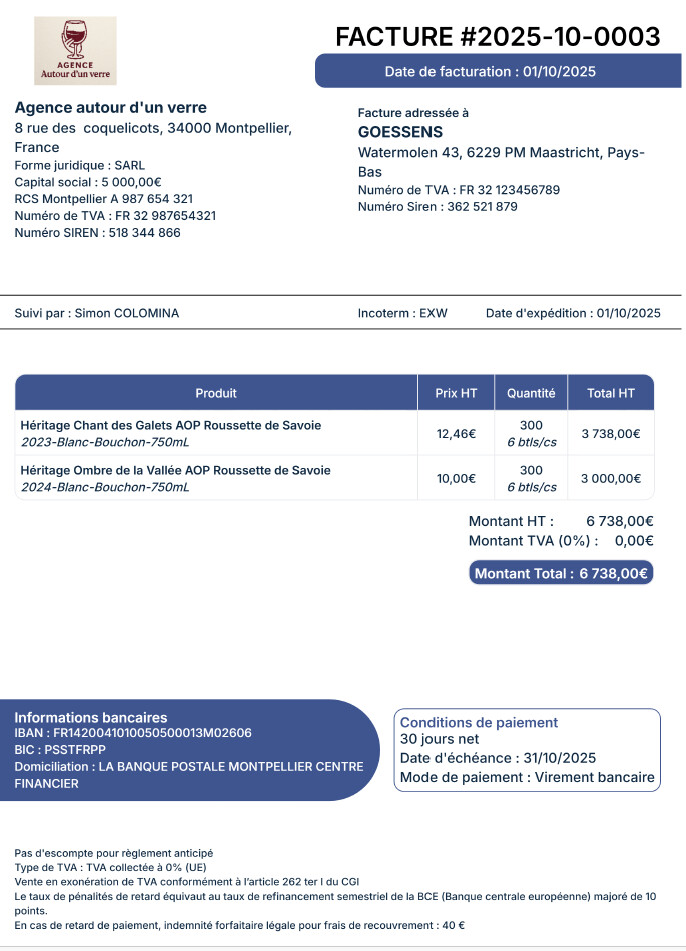
Yes, the invoice contains a repeating group with all the ordered products. The other elements are only groups and text with also one HTML element for the logo which I can switch with an image element if needed. Some background colors and text colors are dynamically linked to the user preferences.
I have attached a screenshot of one of my invoices so you can see to what It looks like:

Thank you for your help.

Best regards,
Luno

Hi @lunomis,

Thank you for the additional details and for sharing the screenshot.

Regarding your test with the Group to PDF & Image demo: in some cases the browser may render parts of the content as selectable text, but the plugin still works on a screenshot-based capture under the hood.
As a result, text selectability can vary depending on the browser, operating system, and even the complexity of the group structure. This is why it may look correct in a simple demo but become inconsistent when handling repeating groups, long invoices, or dynamic styling.

Your current setup, especially a repeating group with many ordered products, dynamic colors, and an HTML/logo element, is exactly the type of layout where screenshot-based plugins may lose text layers or mis-handle pagination. That’s why we want to make sure you choose the plugin that behaves consistently across all your invoices, not just the simple ones.

Before we recommend the most reliable option, could you let us know one thing:
What’s the maximum number of items that can appear in your repeating group on a typical invoice?
This will help us determine whether you need multi-page handling, automatic page breaks, or more structured PDF generation.

In the meantime, we’d strongly suggest checking the live demos of all four plugins you’re considering so you can compare how each one behaves with your browser:

Because rendering differs between browsers, testing the demos yourself is the best way to see how selectable text, logo quality, and layout behave in your environment.

Thanks again for your time, and once we have the extra detail about your product list size, we’ll guide you toward the option that fits your invoices best.

Regards,
Support Team
Browse all Zeroqode Plugins for bubble

Banner_Last3

Hi @lunomis,

Just checking in.

Did you have a chance to review the demos and let us know roughly how many items your repeating group can contain per invoice?

Once we have that detail, we’ll be able to suggest the most reliable PDF option for your setup.

Looking forward to your reply!

Best regards,
Support Team
Browse all Zeroqode Plugins for bubble
Banner_Last3

Hi @constantin.raicovici,

Thank you for your thorough reply.

I now better understand how the plugin Group to PDF & Image works.

There is no maximum number so for sure an invoice can contain multiple pages.

Best regards,
Luno

Hi @lunomis,

Thanks for the clarification!

Since your invoices can have an unlimited number of items and will definitely span multiple pages, the most reliable options will be the ones that handle true multipage documents rather than a single rendered snapshot.

In this case, we’d strongly recommend focusing on:

• Bubble Page to PDF Converter: good for full-page captures and automatic page breaks
• PDF Conjurer Pro: the most stable choice if you need guaranteed selectable text, sharp logos, and consistent multi-page layout for long invoices

Happy to help further anytime!

Best regards,
Support Team
Browse all Zeroqode Plugins for bubble
Banner_Last3