
Services Plugins FAQs

Major Update: Apex Chart - 54 Charts & Graphs Plugin

Hi everyone, :wave:

We are excited to announce a major update to the Apex Chart - 54 Charts & Graphs Plugin!

The new version (6.157.0) introduces key fixes to improve data visualization accuracy and reliability in your applications.

:wrench: Enhancements & Fixes:
The plugin now correctly processes the following fields in the Heatmap Chart:

  • X-axis label data
  • Y-axis label data

This ensures more precise chart rendering and resolves prior inconsistencies.

:blue_book: Full Setup Guide
For detailed instructions on configuring the plugin after this update, please refer to our updated technical documentation.
:link: Documentation Link:
Apex Chart - 54 Charts & Graphs Plugin Docs

Why Upgrade?

  • Enhanced accuracy for Heatmap Chart labels.
  • Improved compatibility and performance in data visualizations.

:bulb: Note: From version 6.157.0, the fields X-axis label data & Y-axis label data from Heatmap Chart were fixed. It may perturbate the existent setup.

Feel free to reach out with any questions or if you need further assistance! We’re here to help you get the most out of this update.

Regards,
Support Team
Browse all Zeroqode Plugins for bubble

Banner_Last3

1 Like

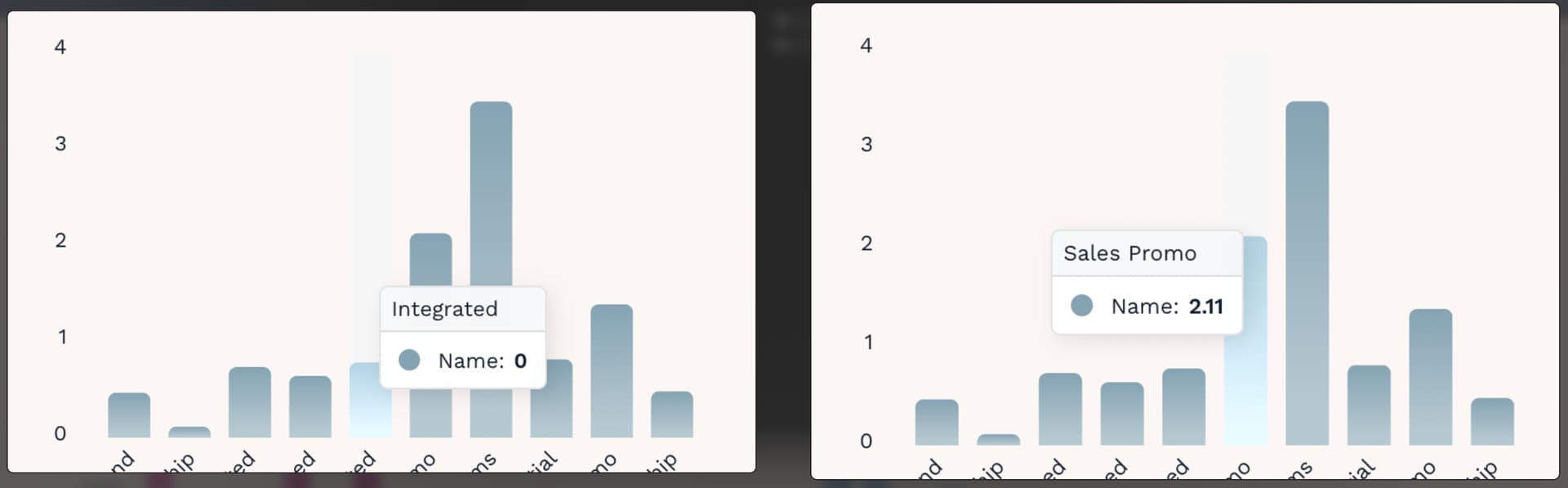
Hi there, I seem to be having an issue with this plugin. When using a Bar Chart with a decimal amount of 2, the tooltip will show ā€œ0ā€ if the metric is under 1 (ie, if it is 0.78, it will just show 0). If it is over 1, then it will show 2 decimal places (ie, 2.11 shows that exact number). I believe this is a bug?

Hello @phil1,

Thank you for reaching out and for the clear explanation and screenshots — that’s very helpful.

I’ve just tested a setup similar to yours on our side here.

From what I can see, both the data labels and the tooltip display decimal values correctly, regardless of whether the value is below or above 1.0. You can also open the link to confirm this behavior yourself.

Since we’re not able to reproduce the issue on our end, it’s likely that something in the app setup is affecting how values below 1 are being handled. At the moment, there are two main possibilities that come to mind: there may be some rounding or formatting happening before the data is passed into the chart, or there could be custom JavaScript on the page that alters the values.

To help us troubleshoot this further, could you please share the following:

  • A screenshot of the chart element configuration in the Bubble editor
  • A screenshot of the data source feeding values into the chart
  • A screenshot of any workflows involved in preparing or formatting the data
  • If you’re using any custom JavaScript on the page, a screenshot and a brief description of what it does

Once we have these details, we’ll be happy to take a closer look and assist you further.

Looking forward to your reply!

Regards,
Egor Smorodinov,
Support Team
Browse all Zeroqode Plugins for bubble
Banner_Last3

Thanks for coming back to me so quickly.

I think I have worked out the issue - if I turn off ā€œAuto Format Large Numbersā€, then this solves the issue. So it seems to be rounding down numbers lower then 1. Below is my list of values, any below ā€œ1ā€, will end up as zero unless I turn off ā€œAuto Formatā€, and as the values are so long, I believe it then rounds them to 0?

Is this a bug at your end, or will I need to format the numbers in Supabase prior to retrieving them (not ideal, as I need both values).

Value: 0.466089875342053
Value: 0.114337078651689
Value: 0.731428571428571
Value: 0.640000000000031
Value: 0.779263537906137
Value: 2.11491240506328
Value: 3.4781307936508
Value: 0.811495384615386
Value: 1.38
Value: 0.480085090218426

Thanks,
Phil.

Hi Phil,

Thanks again for the detailed follow-up — and nice catch on this.

I’ve now been able to reproduce the same behavior on my test page as well. To clarify, the bar itself is rendered at the correct size, so the underlying value is handled correctly. The issue is limited to the tooltip and data label formatting when ā€œAuto Format Large Numbersā€ is enabled.

When the dataset contains values smaller than 1 with long decimal precision, the auto-formatting logic can round those values down to 0 in the tooltip and label, even though the visual bar height remains accurate. This confirms it’s not related to Supabase formatting on your side.

I’ve created an internal task for this so our dev team can review and improve the formatting behavior. For now, the recommended workaround is:

  • Disable ā€œAuto Format Large Numbersā€ when your dataset includes values below 1

This avoids the rounding issue while preserving both precision and correct display.

You don’t need to pre-format the values in Supabase, and we agree that doing so wouldn’t be ideal in your case.

Thanks again for the clear report — I’ll keep you posted once we have an update or fix in place.

Regards,
Egor Smorodinov,
Support Team
Browse all Zeroqode Plugins for bubble
Banner_Last3

Great, thanks for that. I’ll go with your solution and keep an eye out for a new release of the plugin. Appreciate your help.

Phil.

Hi Phil,

Glad to hear the workaround does the trick :+1:

Just to reassure you — once our dev team completes the investigation and we have an update or fix ready, I’ll personally reach out and let you know. You won’t miss it.

Thanks again for your patience and for working through this with us.

Regards,
Egor Smorodinov,
Support Team
Browse all Zeroqode Plugins for bubble
Banner_Last3

Hi @phil1,

Thank you for the detailed report and for sticking with us on this.

We’ve identified and fixed an issue related to the ā€œAuto format large numbersā€ setting. The problem was limited to how tooltips and data labels were formatted for values below 1, while the bar size itself was already rendered correctly.

The fix has now been rolled out in plugin version 6.164.0 and applies to all chart types that use the ā€œAuto format large numbersā€ feature.

Could you please update the plugin to the latest version, test it on your end, and let us know if everything now behaves as expected? Your feedback will help us confirm the fix works correctly across real-world use cases.

Looking forward to hearing from you.

Regards,
Egor Smorodinov,
Support Team
Browse all Zeroqode Plugins for bubble
Banner_Last3