
Should the native mobile drop down plugin’s selected value be available as an option to update a field in a data source? Cuz it’s not.
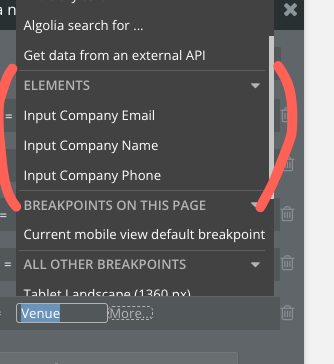
Only my inputs show up.
Hi @wardey0513 ,
Thank you for reaching out!
To help troubleshoot this issue, could you please clarify a few things:
1. Which plugin are you using exactly?
* Native Mobile Dropdown
* Native Mobile Multi Dropdown
2. Could you share some additional details about your setup?
- Are you trying to update the data source using a button’s workflow?
- Is the button located within the same parent group as the dropdown element?
- Could you share a screenshot of your workflow setup and element hierarchy?
Important note: For the dropdown’s selected value to be accessible in a workflow (like on a button click), the button needs to be within the same parent group as the dropdown element. This ensures the button can “see” and reference the dropdown’s state.
For example:
Group A (parent)
  ├── Native Mobile Dropdown element
  └── Button (with workflow to update entry)
If they’re in different parent groups or not properly nested, the selected value won’t be available as a data source to update.
Could you provide these details so we can better understand your setup and help resolve the issue?
Thanks!
Support Team
Browse all Zeroqode Plugins for bubble
