Hi everyone,
Is it possible to add a custom background color to a table row (the header row for instance)?
And also, is there a way to chose the border radius?
Best regards,
Luno

Hi everyone,
Is it possible to add a custom background color to a table row (the header row for instance)?
And also, is there a way to chose the border radius?
Best regards,
Luno
Hi @lunomis,
Thanks for reaching out!
Regarding your questions about PDF Conjurer Pro - at the moment, the plugin allows styling at the overall table level, but it doesn’t support applying a different background color to a specific row (such as just the header row).
A suggested workaround you can try is creating a separate table element for the header, applying the desired background color there, and then placing your main data table directly underneath. This gives you more visual control while keeping everything structured properly in the PDF.
As for border radius, the plugin currently does not include a setting to adjust border rounding on tables. The PDF rendering engine we use does not support border radius styling for table elements at this time.
If you could share a bit more about the exact layout you’re trying to achieve (for example, a quick screenshot or mockup), we’d be happy to review it and see whether there’s a better workaround - or evaluate adding more granular styling options in a future update.
Thanks again for your message, and we’re looking forward to your reply!
Best regards,
Support Team
Browse all Zeroqode Plugins for bubble

Thank you for your reply and for your transparency.
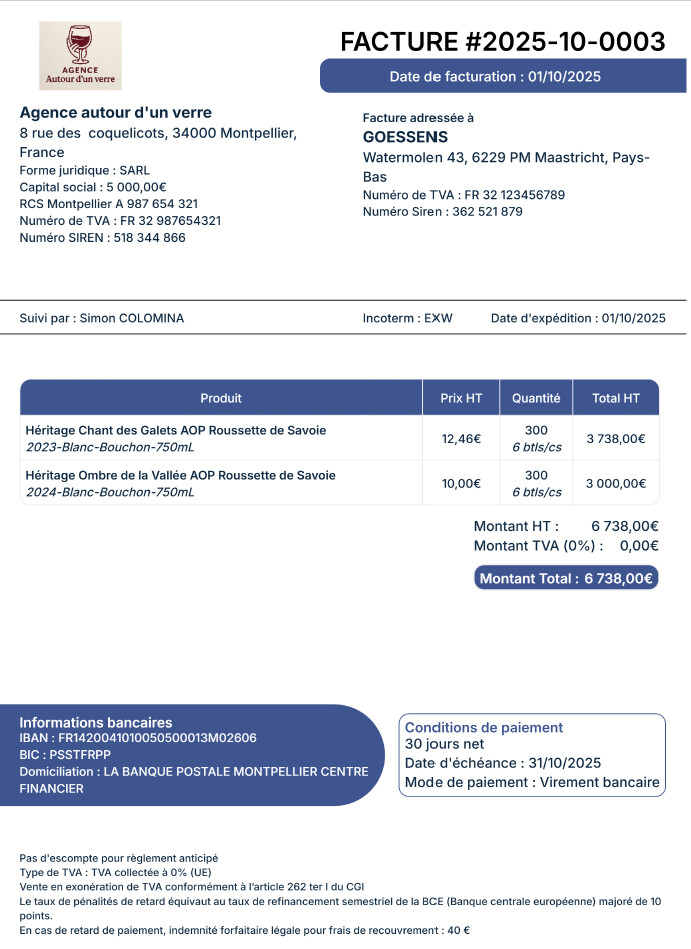
You can find below a screenshot of the layout I would like to reproduce:
Best regards,
Luno
Hi @lunomis,
Thank you for sharing the screenshot.
We understand that you’re looking to reproduce a layout with styled header sections, rounded containers (such as the “Informations bancaires” block), colored table headers, and pill-shaped total amounts.
At the moment, with PDF Conjurer Pro, table-level styling is supported, but more advanced visual styling - such as rounded corners, pill-shaped backgrounds, or selectively styled header rows inside a single table - isn’t natively available due to the limitations of the PDF rendering engine.
That said, a layout like the one in your screenshot can still be approximated using a structured approach:
We encourage you to try structuring the layout this way and see how close it gets to your desired design. If you run into any issues specifically related to the plugin’s behavior or rendering, please let us know - we’ll be happy to review and assist further.
Thanks again for the detailed example, and we look forward to your feedback!
Best regards,
Support Team
Browse all Zeroqode Plugins for bubble
Hi @lunomis,
Just following up to check whether you had a chance to try structuring the layout as suggested.
We’d love to hear how it went. If you ran into any issues related to the plugin’s behavior or rendering, feel free to share the details and we’ll gladly take a closer look.
Looking forward to your feedback.
Best regards,
Support Team
Browse all Zeroqode Plugins for bubble