Hi,
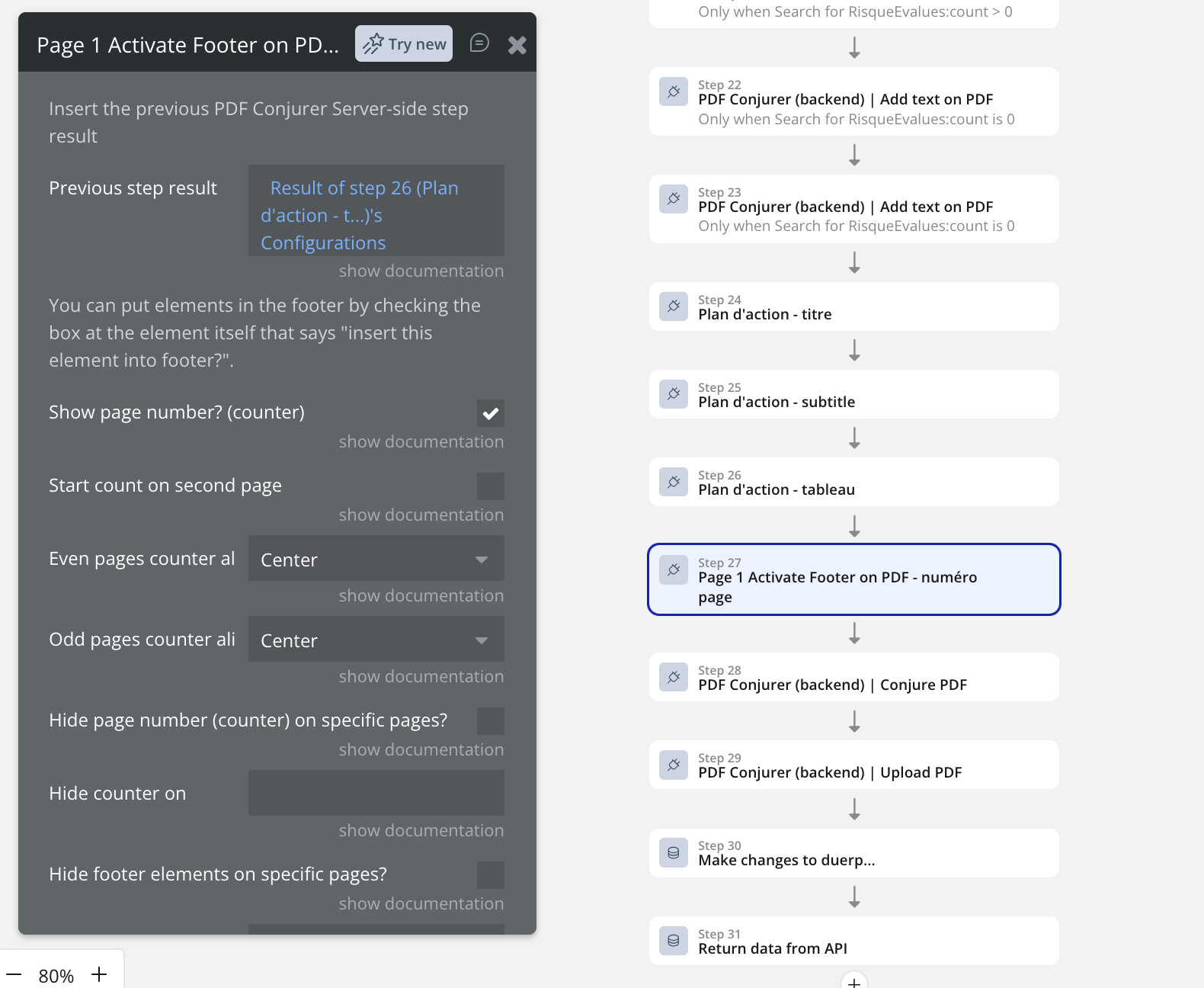
I’m using PDF Conjurer Pro in a backend API workflow to generate a multi-page PDF. I’ve enabled the automatic page counter via “Activate Footer On PDF” (“Show page number? (counter)” checked), but the footer displays “NaN” instead of the actual page number on every page. It alternates position (left/right) correctly according to odd/even page settings, but the number itself is always “NaN”.
Steps I’ve already validated, following your documentation exactly:
"Previous step result" on the Activate Footer action correctly points to the result of the immediately preceding step in the chain.
Tried moving "Activate Footer On PDF" to right after "Initialize PDF Document" (before any other content).
Tried adding a "Define new style to font" action and referencing it in "Counter style" (a field I noticed in the editor but don't see documented on your docs page).
All other margin/alignment fields are left at default or explicitly set to 0.
The rest of the document (text, images, tables) generates correctly — only the automatic page counter fails.
This is a backend (server-side) workflow, running under a paid Pro subscription. Is this a known issue with the page counter in backend/server-side workflows specifically? Any guidance on what could cause “NaN” would be very helpful, as this feature is important for the document I’m generating (a legal compliance document).
Thanks!